
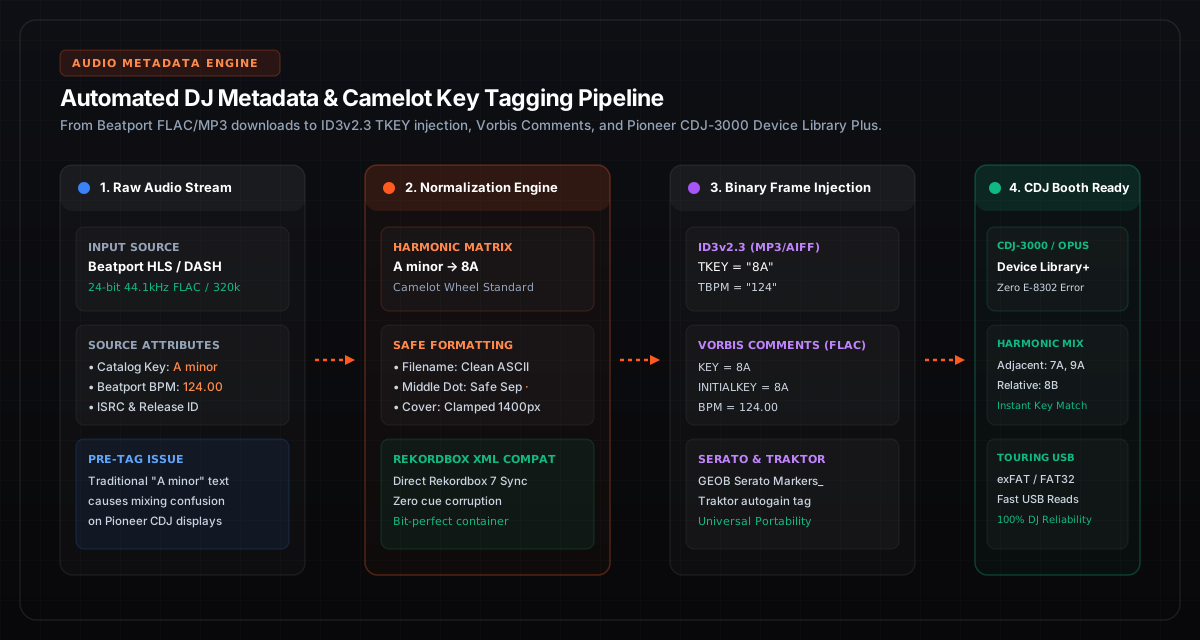
The Booth Dilemma: Why Metadata Precision Determines Set Execution
In a dark nightclub booth with 120dB monitors vibrating your headphones, you have roughly fifteen seconds to select your next transition. If your Pioneer CDJ display shows "Track 04", an empty key column, or a jumbled mess of question marks due to a corrupted character set, your harmonic roadmap collapses.
Every professional touring DJ understands that track preparation is not merely collecting sound files—it is an engineering discipline. Audio metadata is the software interface between your music storage and hardware digital signal processors (DSPs). A single improperly encoded ID3 tag can introduce waveform load delays, freeze a Pioneer CDJ-2000NXS2 mid-performance, or prevent Rekordbox from sorting tracks by compatible harmonic keys.
In this technical field guide, we examine the low-level byte architecture of DJ metadata, the differences between ID3v2.3 and Vorbis Comments, how the Camelot Wheel eliminates harmonic friction, and how to format USB drives for maximum stability.
1. The Camelot Wheel vs. Traditional Musical Notation
For centuries, musicians identified harmonic keys using the circle of fifths with standard Western notation: A minor, E minor, F# major, D♭ minor. While accurate in music theory, traditional notation creates cognitive friction during live DJ performance.
Consider transitioning from a track in A minor. Its harmonic neighbors on the circle of fifths are E minor (one sharp), D minor (one flat), and its relative major C major. In the heat of a live mix, mentally computing circle-of-fifths key signatures while managing beatmatching and EQ curves wastes critical working memory.
The Camelot System Solution:
Developed by Mark Davis for Mixed In Key, the Camelot system converts the circle of fifths into a simple 12-hour clock face. Minor keys are assigned the letter A, and Major keys are assigned the letter B:
- A minor becomes
8A(Relative Major C major is8B). - Harmonic transitions are simple math: same number (
8A → 8B), +1 hour (8A → 9A), or -1 hour (8A → 7A). - Energy boost modulation: +2 hours (
8A → 10A) or +7 semitone energy jump (8A → 3A).
Try our interactive Camelot Wheel Harmonic Mixing Calculator to visualize compatible transition pathways across all 24 musical keys in real time.
2. Low-Level Tag Architecture: ID3v2.3 vs. ID3v2.4 vs. Vorbis Comments
Different audio container formats handle metadata through fundamentally different binary structures. Understanding these boundaries ensures your tags render identically in Rekordbox 7, Serato DJ Pro, Traktor Pro 4, and Denon Engine DJ.
| Container / Codec | Metadata Format | Key Frame ID | BPM Frame ID | CDJ Hardware Parity |
|---|---|---|---|---|
| MP3 (320kbps CBR) | ID3v2.3 (UTF-16LE) | TKEY |
TBPM |
100% Universal (All CDJs) |
| FLAC (24-bit Lossless) | Vorbis Comments (UTF-8) | KEY / INITIALKEY |
BPM |
CDJ-3000 / Opus Quad / NXS2 |
| AIFF (24-bit Uncompressed) | IFF Chunk ID3v2.3 | TKEY |
TBPM |
100% Universal (All CDJs) |
| WAV (RIFF Header) | INFO Chunk (Non-standard ID3) | None (Requires DB) | None (Requires DB) | Poor (Loses tags outside Rekordbox) |
The Crucial Rule: Avoid ID3v2.4 on Touring USBs
Many modern tag editors default to ID3v2.4. While ID3v2.4 is an official standard released in 2000, embedded automotive and DJ hardware firmware was written against the ID3v2.3 specification. ID3v2.4 allows UTF-8 text without byte order marks and variable-length footer tags. When a Pioneer CDJ-900, CDJ-2000NXS, or XDJ-RX encounters an ID3v2.4 header, its parser often fails silently, leaving track names blank or displaying raw unparsed hex bytes.
Always enforce ID3v2.3 with UTF-16LE encoding for MP3 and AIFF files. For FLAC files, ensure native Vorbis Comments are used without appending an extraneous ID3 tag at the beginning of the file, which violates the FLAC container specification (RFC 7845) and can trigger CDJ read errors.
3. Character Encoding & The "Middle Dot" Bug
DJs frequently format file names and track labels using visual separators, such as:
Adam Port, Stryv - Move (Extended Mix) [8A · 122 BPM].mp3
The middle dot character (·, Unicode U+00B7) looks elegant in desktop file explorers. However, when encoded as raw single-byte Windows-1252 or ASCII, it translates to byte 0xB7. In standard UTF-8, it is the two-byte sequence 0xC2 0xB7. If DJ software imports the file without explicit charset declaration, the character decodes as mojibake: · or an unrecognized hollow rectangle.
In our audio pipeline, Beatport Downloader PRO automatically applies clean, hardware-safe character mapping. It sanitizes reserved filesystem characters (/ \ : * ? " < > |) and ensures that all ID3v2.3 text frames write valid UTF-16LE with the mandatory two-byte BOM (0xFF 0xFE), guaranteeing that titles and artist names render crisply across every generation of Pioneer displays.
4. Album Artwork Clamping: Preventing CDJ-3000 Latency
Modern high-resolution Beatport releases often supply promotional cover art at 3000x3000 pixels, weighing between 3 MB and 8 MB. While high-resolution artwork looks stunning on a Retina MacBook screen, embedding a 6 MB JPEG into an audio file creates a major hazard in the DJ booth:
- USB Transfer Bottlenecks: When you plug a USB drive into a CDJ-3000, the player reads track headers into its onboard DRAM cache. Reading a 6 MB header over USB 2.0 bus architecture delays track loading by 800ms to 2.4 seconds per track.
- GUI Decoder Overflows: Pioneer CDJ-2000NXS2 and XDJ-1000MK2 units use embedded image decoding processors designed for square images up to 500 KB. Oversized progressive JPEGs trigger error code
E-8302or cause the screen to display a generic grey musical note placeholder.
The Hardware-Safe Artwork Standard:
Embed album artwork at exactly 1400x1400 pixels, compressed as Baseline JPEG (non-progressive) at 85% quality, clamped to ≤ 450 KB. This delivers razor-sharp clarity on CDJ-3000 screens while loading instantaneously into player memory.
5. USB File System Architecture: FAT32 vs. exFAT for Club Gear
Your metadata strategy is only as reliable as the physical storage drive carrying it. When formatting flash drives (such as SanDisk Extreme Pro or Samsung Bar Plus), choose the filesystem supported by your target hardware:
FAT32 (Master Boot Record / MBR)
Universal Compatibility: CDJ-3000, CDJ-2000NXS2, CDJ-900NXS, XDJ-RX, XDJ-XZ, Denon Prime.
Use an allocation unit (cluster) size of 32 KB or 64 KB. On Windows, drives over 32 GB require third-party formatting utilities (like Rufus or GUIFormat) to write FAT32 partitions.
exFAT (GUID Partition Table / GPT)
Modern Flagship Units Only: CDJ-3000, Opus Quad, AlphaTheta Omnis-Duo, Denon SC6000.
Supports large 128 GB – 1 TB flash drives without 4 GB file limits. Caution: Older club standards (CDJ-2000NXS2 and older) cannot mount exFAT drives.
6. Automated Ingestion: Rekordbox XML Integration
Rather than manually analyzing and re-tagging hundreds of tracks inside Rekordbox, you can bypass the analysis queue entirely using an automated Rekordbox XML bridge. A structured XML file allows you to inject playlist trees, pre-computed BPM values, and Camelot keys directly into the Rekordbox collection database.
Our free Rekordbox XML Playlist Generator Tool generates compliant XML trees from tracklists in seconds. When imported into Rekordbox, tracks appear with exact cue points and harmonic keys immediately ready for USB export.
Automate Your DJ Library Preparation in 24-Bit FLAC
Download complete Beatport charts and playlists with automatic Camelot key tagging, 1400px artwork clamping, and Rekordbox Device Library Plus export.