
On small studio monitors or consumer headphones, distinguishing between a well-encoded 320kbps MP3 and an uncompressed WAV master is notoriously difficult. In controlled environments adhering to ITU-R BS.1116 double-blind ABX protocols, high-bitrate CBR MP3 files are widely recognized as psychoacoustically transparent to human hearing.
However, when audio is pushed through high-SPL concert sound systems—such as multi-way horn-loaded Funktion-One enclosures or L-Acoustics line arrays—and subjected to real-time DJ processing, subtle engineering distinctions emerge. Rather than lossy audio suddenly becoming unlistenable, lossless formats provide essential technical headroom, phase linearity, and resilience against intersample clipping during digital-to-analog reconstruction.
This guide analyzes the psychoacoustic encoding mechanisms of MP3, explains why raw WAV creates metadata liabilities on club hardware, and demonstrates why 24-bit FLAC files downloaded from beatport-downloader.com deliver the optimal balance of acoustic transparency, processing headroom, and metadata reliability.
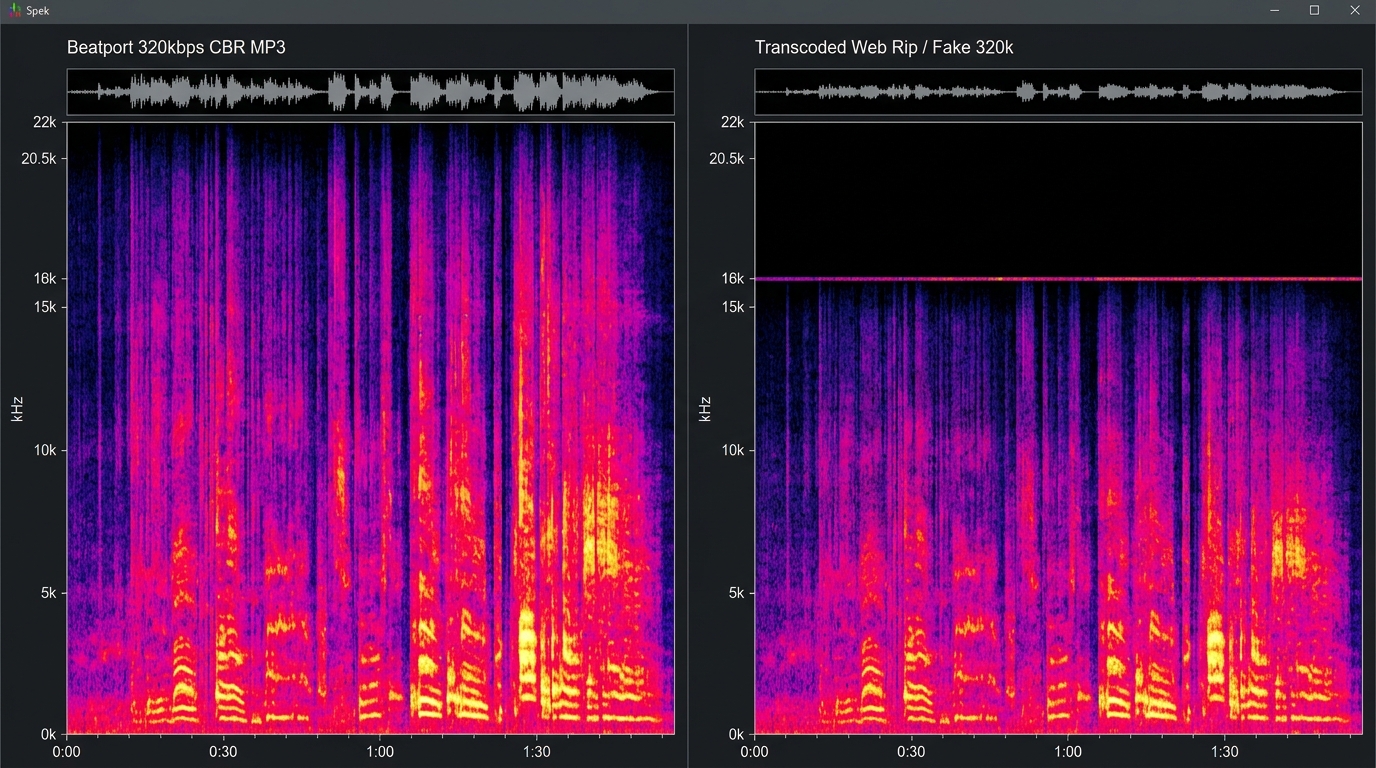
1. Spectral Frequency Analysis: Headroom, Phase & DSP Considerations
To understand the practical distinctions between lossy and lossless audio in performance environments, audio engineers evaluate three primary signal characteristics:
Technical Signal Comparison (Performance Architecture):
================================================================================
Dynamic Range       : 24-bit FLAC provides up to 144 dB; 16-bit / MP3 caps at ~96 dB
Brickwall Filtering : MP3 rolls off near 20.5 kHz; Lossless FLAC extends linearly
Intersample Peaks   : MP3 quantization can introduce +1.5 to +2.0 dBTP reconstruction overshoot
Real-Time DSP / Key : FLAC provides pristine PCM data for time-stretching & stem extraction
Tagging Standard    : FLAC Vorbis comments are universal; WAV RIFF chunks are inconsistent
================================================================================
Intersample Clipping & DAC Reconstruction
Modern electronic music is frequently mastered close to 0.0 dBFS with high loudness density. When a lossy encoder like MP3 quantizes the signal via Modified Discrete Cosine Transform (MDCT) sub-bands, the altered frequency spectrum changes the analog reconstruction waveform.
During digital-to-analog conversion at high sound levels, these reconstructed intersample peaks can exceed 0.0 dBFS by +1.0 to +2.0 dB True Peak (dBTP). On consumer gear or professional DAC stages without dedicated true peak headroom, this can induce subtle intersample clipping. Lossless FLAC preserves the original studio peak levels exactly as approved by the mastering engineer.
Real-Time Pitch Shifting, Key Lock & Stem Demixing
When modern media players engage Key Lock (Master Tempo) or pitch shifting, onboard DSP algorithms continuously slice, time-stretch, and crossfade phase windows in real time. Similarly, modern DJ software uses neural spectrogram masking (e.g. Demucs, Spleeter) for live stem isolation.
Because lossy codecs discard masking-frequency data and introduce quantization noise, running intensive phase-vocoder DSP on lossy source audio compounds artifacts, leading to perceptible flanging or watery transients. Lossless FLAC guarantees that DSP algorithms process complete, uncorrupted harmonic information.
2. Hardware Compatibility Matrix: Pioneer CDJ and Denon Engine
Playing lossless audio requires media hardware capable of decoding high-resolution formats without latency or buffer underruns.
The table below outlines format compatibility across industry-standard touring hardware:
| Media Player Model | 320kbps MP3 | 16-bit / 24-bit WAV | 16-bit / 24-bit AIFF | 16-bit / 24-bit FLAC | Native ALAC | Max Sample Rate |
|---|---|---|---|---|---|---|
| **Pioneer CDJ-3000** | Full Support | Full Support | Full Support | Full Support | Full Support | 96 kHz / 24-bit |
| **Pioneer CDJ-2000NXS2** | Full Support | Full Support | Full Support | Full Support | Full Support | 96 kHz / 24-bit |
| **Pioneer CDJ-2000NXS** | Full Support | Full Support | Full Support | **Not Supported** | **Not Supported** | 48 kHz / 24-bit |
| **Pioneer CDJ-900NXS** | Full Support | Full Support | Full Support | **Not Supported** | **Not Supported** | 48 kHz / 24-bit |
| **Pioneer XDJ-XZ / RX3** | Full Support | Full Support | Full Support | Full Support | Full Support | 48 kHz / 24-bit |
| **Denon SC6000 Prime** | Full Support | Full Support | Full Support | Full Support | Full Support | 96 kHz / 24-bit |
NOTE ON VINTAGE HARDWARE:
If you play on older legacy hardware such as the original Pioneer CDJ-2000
or CDJ-900 (non-Nexus), FLAC is not supported. For those specific older decks,
uncompressed AIFF or 320kbps MP3 is required.
3. The Structural Flaws of WAV vs. FLAC and AIFF
Many touring DJs default to buying WAV files under the assumption that raw uncompressed audio is always the safest option. From an engineering and library management standpoint, raw WAV presents serious practical drawbacks.
The WAV RIFF Chunk Issue
WAV files use the Resource Interchange File Format (RIFF). The original specification for WAV did not include a native standard for embedding metadata tags, cover art, or track information.
While modern applications attempt to write ID3 chunks into the RIFF header, there is no universal industry standard for where and how this chunk is placed.
As a result:
- ✦Rekordbox may read the ID3 chunk inside a WAV file, but Serato or Traktor might ignore it.
- ✦Older CDJ players often fail to read track titles from WAV headers entirely, displaying raw file paths (e.g.,
TRACK01~1.WAV) on screen instead of the actual artist and song name. - ✦Embedded album art is rarely supported in WAV files on standalone media players.
AUDIO CONTAINER TAGGING ARCHITECTURES:

WAV Container:
[RIFF Header] -> [Format Chunk] -> [Raw PCM Audio Data] -> [Non-Standard ID3/INFO Chunk]
(Metadata parsing is fragile and inconsistent across different DJ platforms)

FLAC Container:
[fLaC Marker] -> [STREAMINFO] -> [VORBIS_COMMENT (Strict Standard)] -> [PICTURE] -> [Audio Frames]
(Metadata and artwork are strictly standardized and read reliably by modern DJ software)
FLAC and AIFF: Lossless Audio with Reliable Metadata
FLAC (Free Lossless Audio Codec) uses Vorbis comments, a strict and universally defined metadata standard. Tags, Camelot keys, high-resolution artwork, and cue points are stored in dedicated header blocks preceding the audio stream.
AIFF (Audio Interchange File Format), developed by Apple, handles uncompressed PCM audio like WAV, but uses standard ID3 chunk wrappers that work cleanly across Rekordbox and CDJ hardware.
4. How to Download Lossless 24-Bit FLAC Files via Beatport Downloader
Obtaining lossless music with fully formed metadata is straightforward when using beatport-downloader.com.
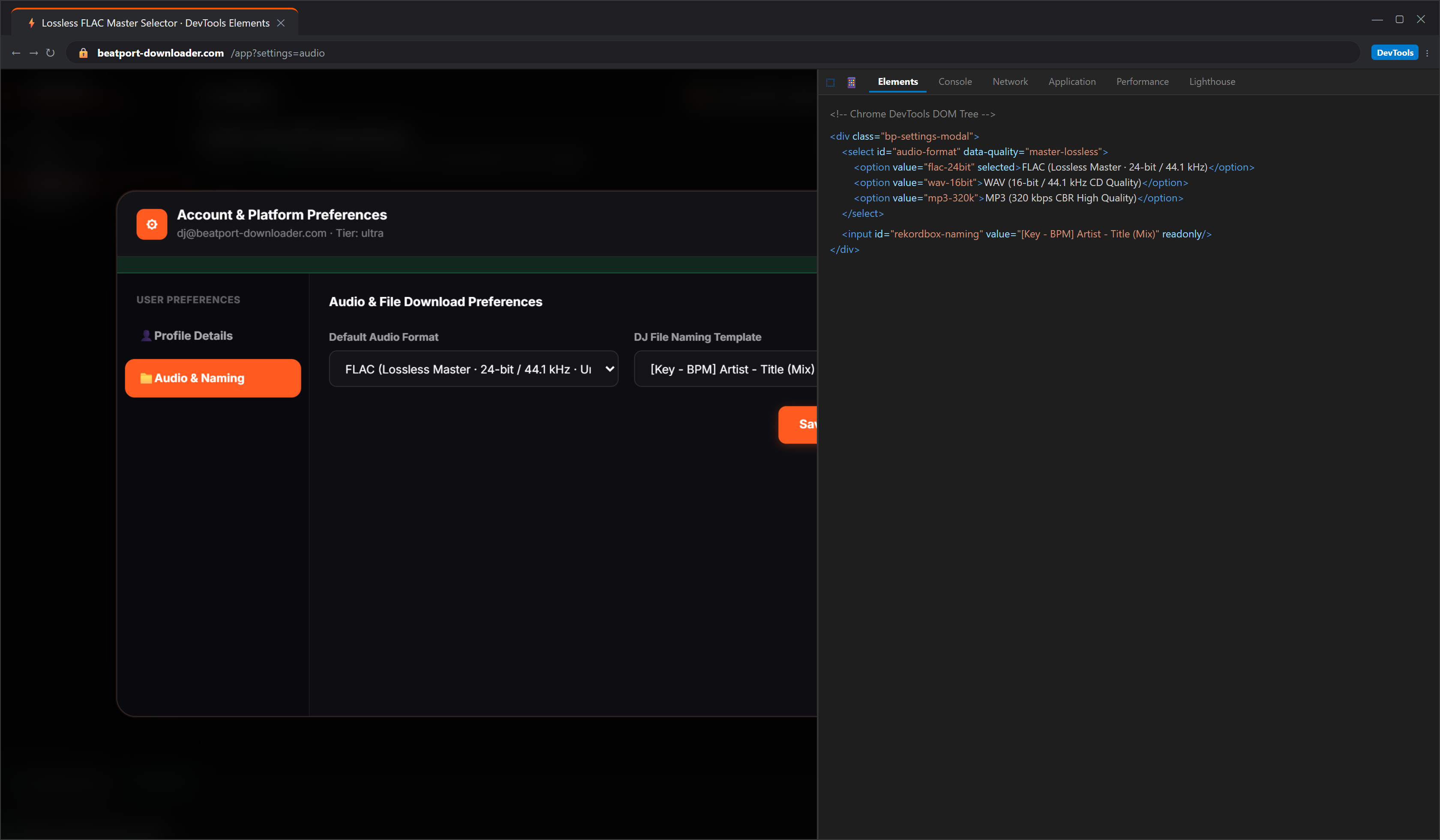
Step-by-Step Lossless Export Guide:
1. Copy the URL of your chosen release or track from Beatport.
2. Paste the URL into the search bar at beatport-downloader.com.
3. In the format dropdown menu, select Lossless FLAC (24-bit).
4. Ensure the Embed Artwork and Preserve Master Studio Dynamic Range options are toggled on.
5. Click Download. The system extracts the source stream, embeds verified Vorbis metadata headers, injects full-size cover art, and outputs a ready-to-play lossless file.
5. Audio Format Comparison Table
| Format | Bitrate / Encoding | Dynamic Range | Native ID3/Tag Support | Club PA Reliability | Storage Space (1,000 Tracks) |
|---|---|---|---|---|---|
| **MP3** | 320 kbps (CBR, Lossy) | ~96 dB (16-bit equivalent) | Excellent (ID3v2.3) | Good (High transparency) | ~10 GB |
| **WAV** | 1411.2 - 2304 kbps (Uncompressed) | Up to 144 dB (24-bit) | Poor / Non-Standard | High (Fails metadata/art) | ~50 - 80 GB |
| **AIFF** | 1411.2 - 2304 kbps (Uncompressed) | Up to 144 dB (24-bit) | Excellent (ID3 Chunk) | High (Native on CDJs) | ~50 - 80 GB |
| **FLAC** | Variable (~900 - 1600 kbps, Lossless) | Up to 144 dB (24-bit) | Excellent (Vorbis Comments) | High (CDJ-2000NXS2 & 3000) | ~30 - 45 GB |
6. Frequently Asked Questions
Can the audience in a club really tell the difference between 320kbps MP3 and FLAC?
In standard double-blind listening tests adhering to ITU-R BS.1116 recommendations, high-bitrate 320kbps CBR MP3 is widely recognized as psychoacoustically transparent to human listeners.
On high-efficiency concert sound systems, professional DJs prefer lossless FLAC because it provides essential technical headroom: avoiding intersample clipping on hot masters, eliminating artifacts during real-time Master Tempo or Key Shift processing, and ensuring 100% reliable Vorbis metadata tags without WAV corruption risks.
How can I check if a track is a fake transcode or upscaled MP3?
Use free spectral analysis tools like Spek or Audacity. Open the audio file and examine the frequency spectrogram:
- ✦A true lossless file shows active musical frequencies extending cleanly up to 22 kHz and beyond.
- ✦A fake transcode (an MP3 re-saved as a WAV or FLAC) shows a sharp frequency cutoff at 16 kHz (128 kbps transcode) or 20 kHz (320 kbps transcode) with empty space above it.
+-------------------------------------------------------------------------+
|                  SPEK FREQUENCY CUTOFF REFERENCE CHART                 |
+-------------------------------------------------------------------------+
|  True 24-bit FLAC / WAV : Continuous harmonic energy to 22.05 kHz+      |
|  Genuine 320kbps MP3    : Dense energy up to hard 20.5 kHz cutoff line  |
|  Fake Upscaled File     : Sudden emptiness above 16 kHz or 20 kHz       |
+-------------------------------------------------------------------------+
Does playing FLAC files drain CDJ processor performance?
Modern players like the CDJ-3000 use dedicated multi-core processing units (MPUs) with hardware-level FLAC decoding. The processor decompresses the audio stream into PCM memory buffers effortlessly, introducing zero latency or track-loading delays.
ENGINEERING VERDICT:
For modern touring DJs performing on Nexus 2, CDJ-3000, or Denon Prime setups,
24-bit FLAC downloaded through beatport-downloader.com delivers studio-grade
audio quality while halving your USB storage footprint compared to raw WAV.